
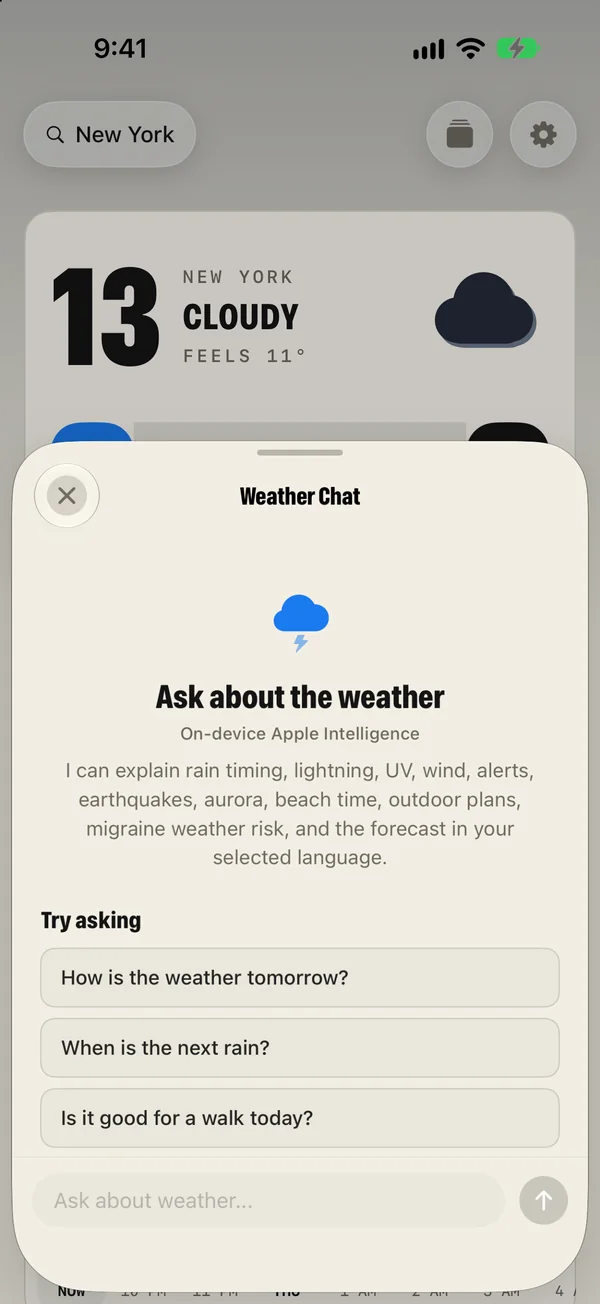
The AI Weather Brief is a short written summary of what matters today, shown under the hourly forecast. Weather Chat is the round button above the tabs: tap it and ask a question such as “When is the next rain?” Both use Apple Intelligence on your device, so they need an iPhone, iPad or Mac that supports it. Without it, the app shows a plain summary built from the forecast.
The AI Weather Brief
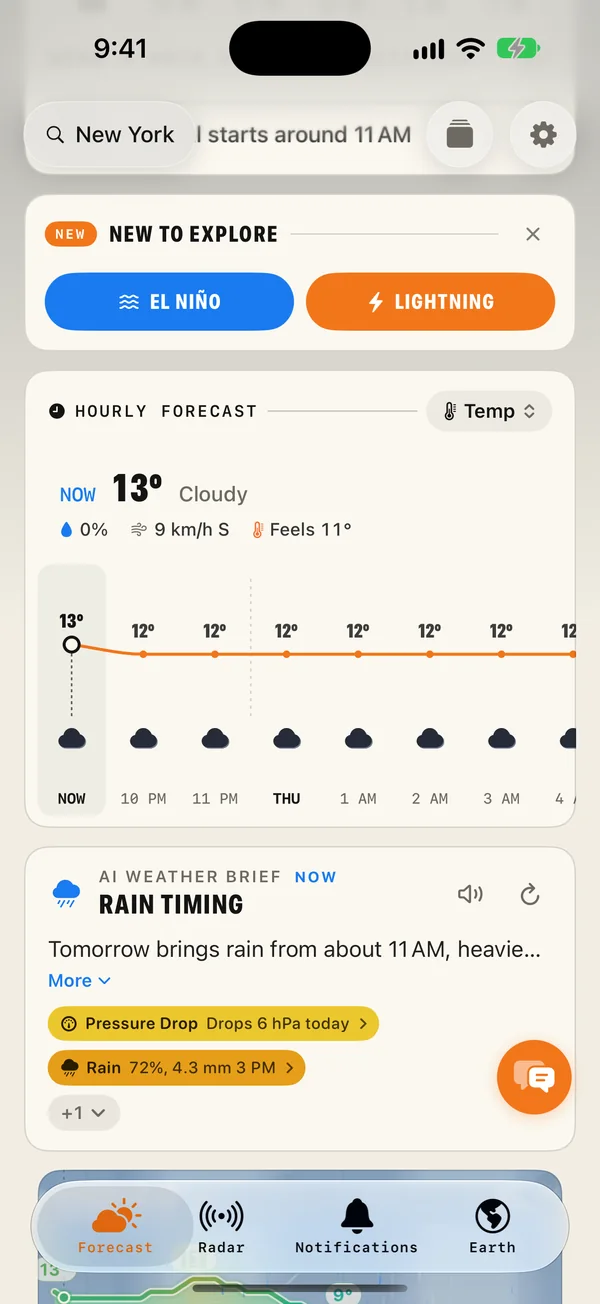
Scroll a little on the Forecast tab and, under the hourly forecast, you will find the brief: a few sentences about what matters today.
| Part | What it does |
|---|---|
| The text | A short written summary of the day, made on your device from the latest forecast. |
| Listen | The speaker reads the brief aloud. |
| Write it again | Makes a fresh brief from the latest forecast. |
| More | Opens the whole text. |
| Key points | Each chip is one thing to watch: rain, wind, a pressure drop. Tap one for its chart. "+1" shows the rest. |
The chips are the part to notice. The brief tells you what is coming, and each chip takes you to the evidence: the chart for that reading, which you can drag along to read hour by hour.
Weather Chat
The round button that floats above the tabs opens Weather Chat. Type a question the way you would ask a friend who has seen the forecast.
Things you can ask
- How is the weather tomorrow?
- When is the next rain?
- Is it good for a walk today?
- Do I need sunscreen this afternoon?
- Will it be windy tonight?
It can explain rain timing, lightning, UV, wind, alerts, earthquakes, aurora, beach time, outdoor plans and migraine weather risk, for the place you are looking at. Tap a suggestion to send it, or write your own.
Getting good answers
- Ask about a time. "Will it rain between 5 and 7?" gets a more useful answer than "Will it rain?"
- Ask about a plan. "Is Saturday or Sunday better for a barbecue?" lets it compare for you.
- Switch place first. The chat answers for the place shown on the Forecast tab. Change it at the top if you are asking about somewhere else.
- Check the chart for anything important. An answer is a summary. The hourly forecast and the weathergraph have the detail.
What you need
Both features use Apple Intelligence, the on-device AI built into recent Apple devices. That means:
- An iPhone 15 Pro or later, or a recent iPad or Mac with Apple silicon.
- A system version that includes Apple Intelligence, with it switched on in the device's Settings.
- A supported language. Answers are written in the app's language where Apple Intelligence supports it.
On a device without Apple Intelligence you still get a summary. The app builds a plain one from the forecast instead, and everything else works the same. Weather Chat is part of Premium.
What stays on your device
The brief and the chat answers are written on your device. Your questions are not sent to a server to be answered. The app fetches the forecast for your place as it always does, and Apple Intelligence turns it into text locally.
This is also why they are quick, and why they work for any place you have a forecast for.
How far to trust it
A written summary is a convenience on top of the forecast, with the same limits as the forecast underneath. Forecasts are reliable for the next few days and less so further out, and a summary cannot be more certain than its source.
- For everyday decisions such as a jacket, an umbrella or the best hour for a run, the brief is all you need.
- For anything that matters, look at the numbers. Tap the chips, read the weathergraph, check the radar.
- For dangerous weather, official warnings come first. They appear above the forecast, separate from the brief.
Voice
If you would rather listen, tap the speaker on the brief and the app reads it aloud. Settings › Intelligence & Voice has the options for the brief, Weather Chat and spoken weather.
Common questions
Which devices support Weather Chat and the AI brief?
Devices that support Apple Intelligence: iPhone 15 Pro and later, and recent iPad and Mac models with Apple silicon, with a system version that includes Apple Intelligence and with it switched on. On other devices the app shows a plain summary made from the forecast.
Is my question sent to a server?
No. Weather Chat and the AI Weather Brief run on your device with Apple Intelligence. The app fetches the forecast for your place as usual, and the text is written locally.
Can the AI brief be wrong?
It is written from the forecast, so it is only as good as the forecast, and a summary can leave things out. The numbers on the Forecast tab are the source. Tap a key-point chip under the brief to see the chart behind it.
Can it read the weather aloud?
Yes. Tap the speaker on the brief and Magic Weather reads it to you. Voice options are in Settings › Intelligence & Voice.
Getting started with Magic Weather: your first ten minutes
Install Magic Weather, set your place, turn on alerts, pick a theme and add a widget. A ten-minute setup guide for iPhone, iPad, Mac, Watch and TV.
How to read a meteogram (and see your whole week in one picture)
A meteogram shows temperature, rain, wind and sky on one timeline. Learn to read each line in two minutes, and spot the best hours of your week.
What does a 40% chance of rain actually mean?
A 40% chance of rain does not mean it rains 40% of the day or over 40% of the area. Here is the real definition, and how to plan around the number.