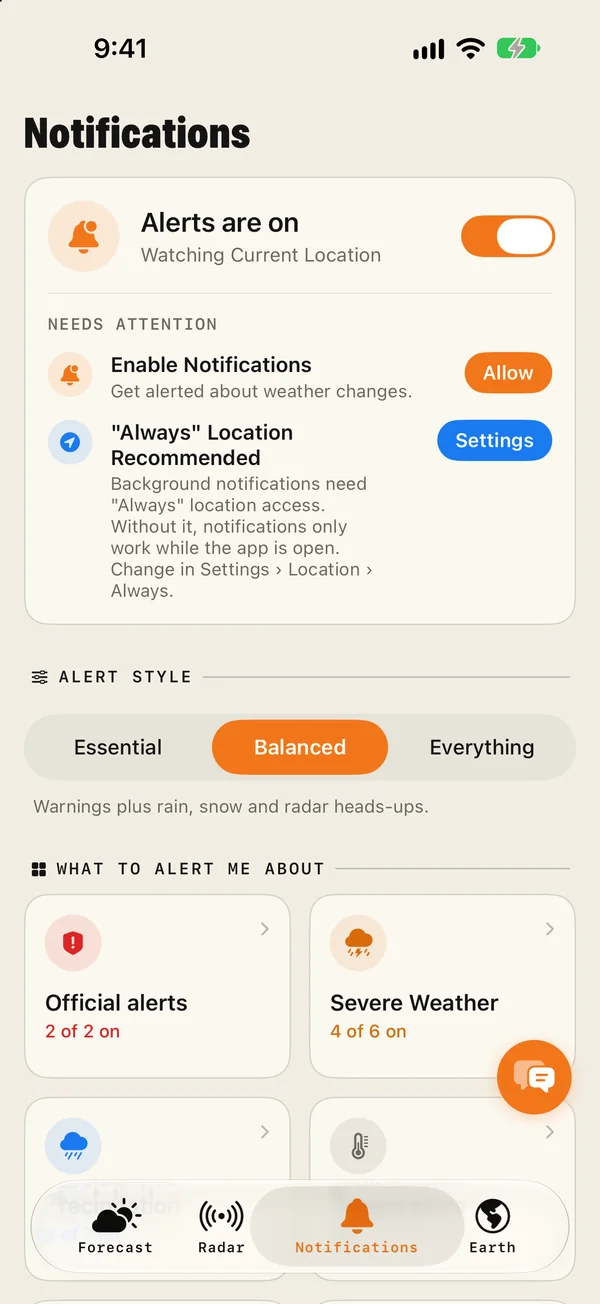
In Magic Weather, open the Notifications tab, switch Alerts on, allow notifications, and choose an alert style. Even the quietest style, Essential, includes official warnings from national weather services and dangerous weather. Then open the Official alerts and Severe Weather tiles to check what is switched on, and set location access to Always so warnings follow you when you travel.
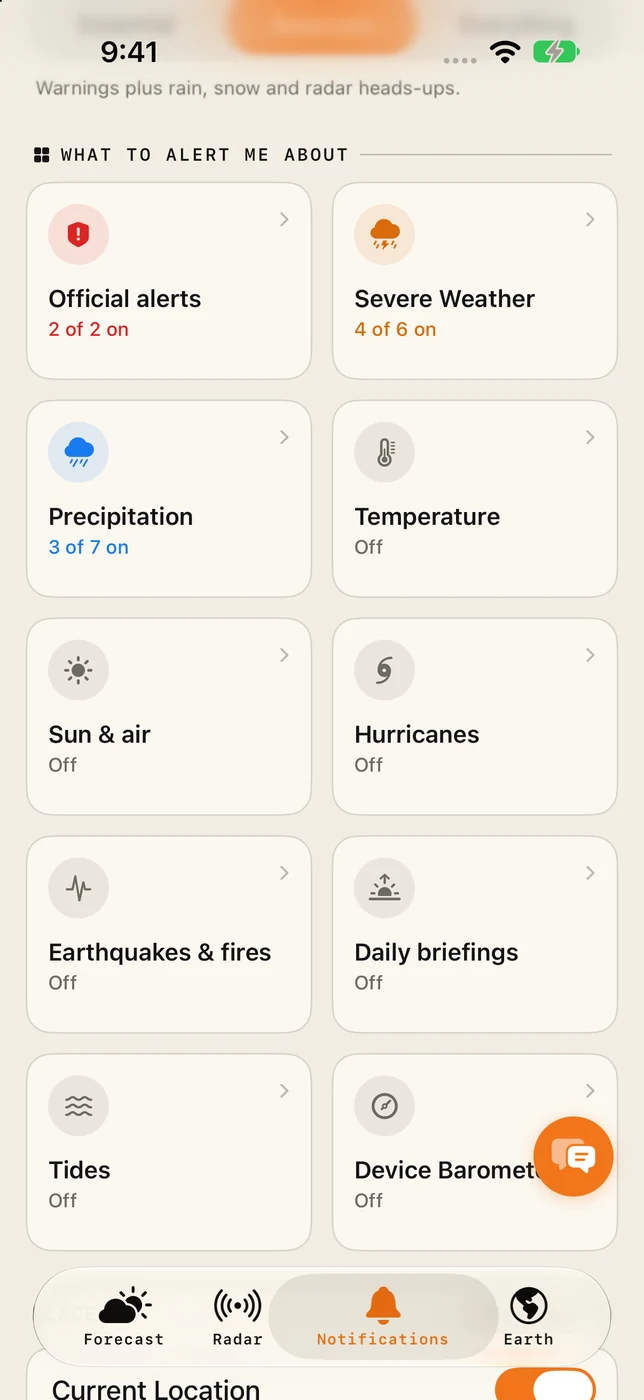
First, the basics. No app replaces your government's emergency alerts or the instructions of local authorities. Keep emergency alerts switched on in iOS Settings › Notifications, and treat an app as the earlier, more detailed layer on top.
Switch alerts on
- Open the Notifications tab. Make sure the top card says Alerts are on.
- If it shows "Needs attention", tap Allow so that iOS can show notifications.
- Tap Settings beside "Always" Location and choose Always. This lets warnings follow you while the app is closed, which matters most when you travel.
- Choose an alert style. All three include official warnings and dangerous weather.
What each category covers
| Category | What it alerts you about |
|---|---|
| Official alerts | Warnings issued by national weather services, such as tornado, flood, storm and heat warnings. Travel advisories are here too. |
| Severe Weather | Severe weather, storms, tornadoes, floods, high wind and lightning. |
| Precipitation | Rain and snow: expected, starting soon, stopping soon, and a radar heads-up. Set these up here. |
| Temperature | Significant drops and rises. |
| Sun & air | High UV, beach time and air quality. |
| Hurricanes | Tropical storms, by ocean basin: Atlantic, Eastern Pacific, Central Pacific and Western Pacific. |
| Earthquakes & fires | Earthquakes and wildfires near the places you watch. |
| Daily briefings | Morning and evening summaries, an umbrella reminder and a daily UV reminder. |
| Tides | Tide alerts for places by the sea. |
| Device Barometer | A fast pressure drop measured by your iPhone itself. How it works. |
Each tile shows how many of its alerts are on, for example "4 of 6 on". Tap a tile to switch them one by one.
Further down the tab there are two more sections: custom notifications, where you build your own rule from a reading and a threshold, and Beta Notifications, a set of experimental alerts such as frost, black ice, fog, rainbow watch and aurora watch. The experimental ones are off by default and may occasionally misfire.
Which style to choose
- Essential: official warnings and dangerous weather only. Your phone stays quiet until something serious is coming.
- Balanced: adds rain, snow and radar heads-ups. The best fit for most people.
- Everything: every alert, summary and reminder.
If you only want the serious ones, choose Essential and leave it. That is exactly what it is for.
Where official warnings come from
Official alerts are issued by government weather services: the national alerts feed in the United States and the continent-wide warning network in Europe. Magic Weather shows them as they are issued, with their severity and the time they are in force.
Two vocabularies are worth knowing:
| United States | Meaning |
|---|---|
| Advisory | Weather that is a nuisance or a hazard if you are not careful. |
| Watch | Conditions favour dangerous weather. Be ready. |
| Warning | It is happening or about to. Act now. |
| Europe | Meaning |
|---|---|
| Yellow | Be aware. Weather may disrupt some activities. |
| Orange | Be prepared. Dangerous weather is likely. |
| Red | Take action. Exceptionally dangerous weather. |
Where alerts appear in the app
- Above the forecast. When a warning is active for the place you are looking at, it appears at the very top of the Forecast tab. Tap it for the details.
- On your places list. A triangle marks any saved place with an active alert, on iPhone and in the Mac sidebar.
- On the Lock Screen. A serious alert can appear as a Live Activity that stays visible while it is in force.
- As a notification, in one short line: what, when and how strong.
Alerts when you travel
- Leave location on Always. The alerts then switch to wherever you are, without you doing anything.
- Save your destination before you go, and check it for a triangle.
- Save the places where family live. You will see their warnings as well as your own.
Make sure they can reach you
- iOS Settings › Notifications › Magic Weather: Allow Notifications on, with sounds on.
- Focus modes: add Magic Weather to the allowed apps in any Focus you use overnight, if you want warnings to break through.
- Apple Watch: notifications from your iPhone are mirrored to your wrist, which is often the one you notice.
When an alert arrives
- Read the official text. Tap the alert in the app for the full warning.
- Check the radar to see where the storm is. How to read it.
- For thunderstorms, know how to judge the distance of lightning and when to go indoors.
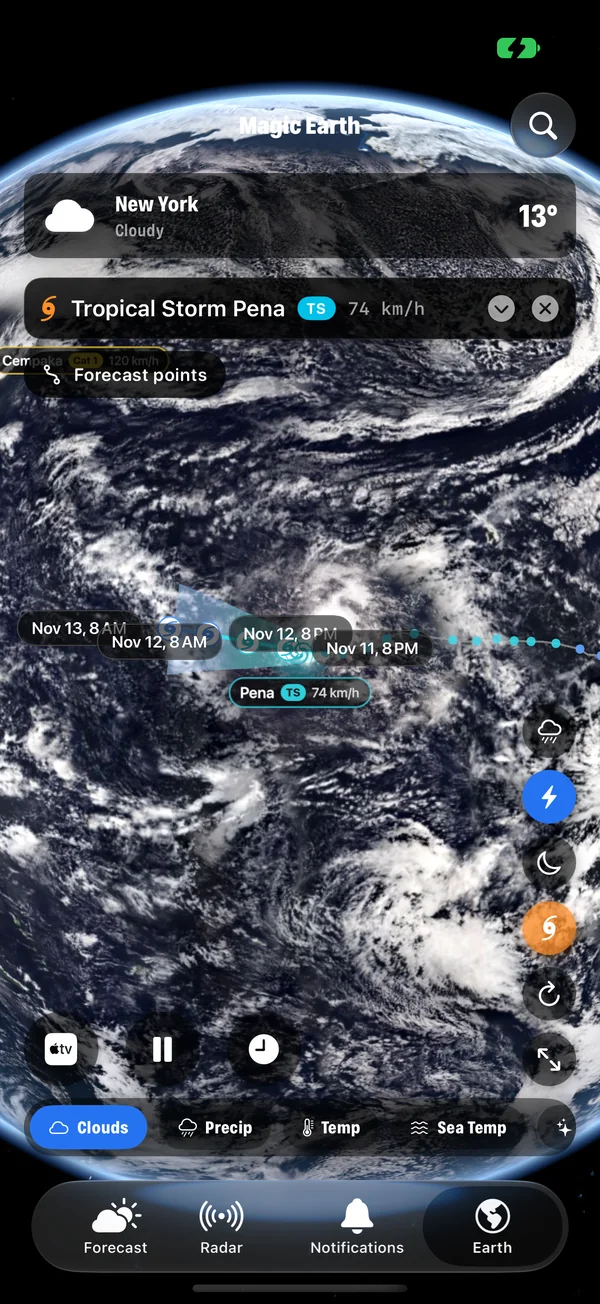
- For hurricanes, follow the storm on the Earth. How to track it.
Common questions
Does my iPhone give severe weather alerts by itself?
iPhones in many countries receive government emergency alerts for the most serious threats. These are separate from any app and are controlled in Settings › Notifications, at the bottom of the screen. Keep them on. A weather app adds earlier, more detailed and more local information on top.
What is the difference between a watch and a warning?
In the United States, a watch means conditions are right for dangerous weather to develop, so be ready. A warning means it is happening or about to happen, so act now. Other countries use colour codes, typically yellow, orange and red, for increasing severity.
Can I get alerts for a city I am not in?
Yes. Save the place in the app. Saved places with an active warning are marked with a triangle in your places list, and the alerts appear above the forecast when you open that place.
Will severe weather alerts wake me at night?
Notifications follow your iPhone's sound and Focus settings. If you use a Sleep Focus and want weather warnings to come through, add Magic Weather to the apps allowed in that Focus.
How to get rain alerts on your iPhone before it starts
Set up rain alerts on iPhone with Magic Weather: a notification before rain starts and stops, a Live Activity that follows the shower, and fixes if none arrive.
How far away is lightning? Count the seconds
Count the seconds between the flash and the thunder and divide by three for kilometres, or five for miles. Plus the 30-30 rule and where to shelter.
How to track hurricanes and tropical storms on a 3D globe
Follow every active hurricane, typhoon and tropical storm on a live 3D Earth with Magic Weather: track, cone, wind and pressure on iPhone, Mac and Apple TV.